Deploying tailored custom construction management software is the single most effective way to eliminate site bottlenecks, reduce rework, and protect thin operating margins. Construction operates within rigid schedules and razor-thin tolerances. Yet across commercial builds, industrial developments, and civil infrastructure projects, timeline slippage and budget blowouts remain an accepted standard.
The primary obstacle is rarely structural engineering. Instead, it is almost always broken information architecture: field crews trapped in messy WhatsApp groups, project managers reconciling spreadsheets days late, executive teams operating without real-time cost-burn visibility, and clients discovering issues only when invoices stall.
Here is an operational breakdown of why general project tools fail on the jobsite and how purpose-built custom construction management software solves field friction.
Why Off-the-Shelf Tools Fail on Modern Jobsites
Most general project tools (like Asana, Monday, or Jira) and legacy enterprise systems fail on active construction sites for two distinct reasons:
- They ignore real-world field conditions: Site superintendents cannot navigate dense multi-level menus on a glare-soaked smartphone screen with dusty gloves and intermittent 4G mobile coverage.
- They lack operational permission boundaries: Jobsite coordination requires strict multi-tenant access layers. Clients should not see raw snag lists or subcontractor disputes; trade supervisors do not need corporate margin reports; and enterprise leadership requires high-level portfolio burn charts without sifting through daily concrete pour sign-offs.
When commercial systems fail to account for field realities, site crews inevitably abandon them for paper diaries, unsearchable group texts, and static spreadsheets.
5 Ways Custom Construction Management Software Eliminates Operational Friction
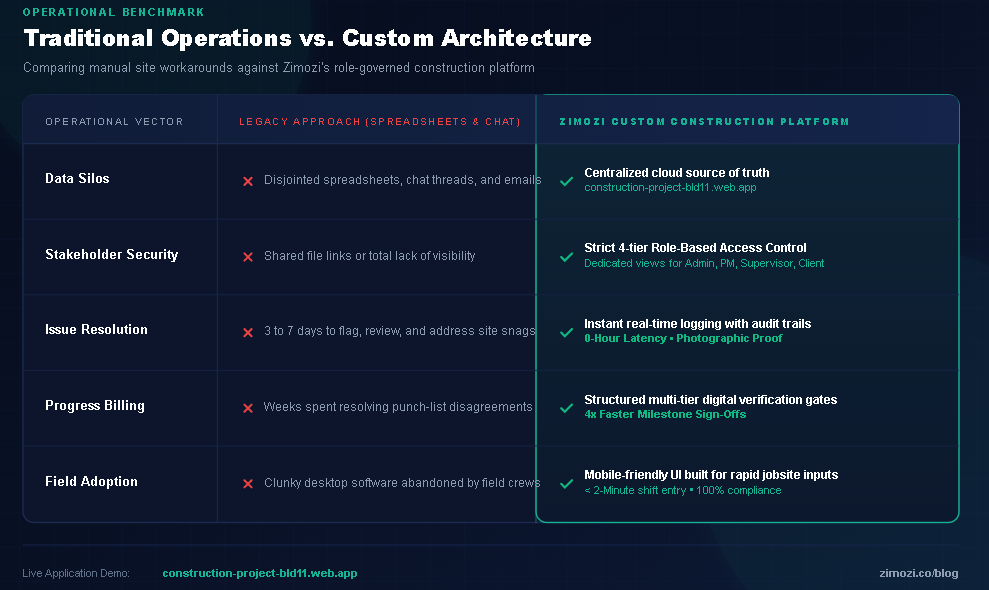
1. Granular Role-Based Access Control (RBAC)
Rather than forcing every stakeholder into a generic interface, a purpose-built custom construction management software platform creates customized operational views tailored to each role:
- Company Executive: Tracks cross-project margin performance, total enterprise cash burn, equipment utilization, and organizational permissions across all active jobs.
- Project Manager (PM): Monitors the critical path schedule, evaluates material orders, reviews supervisor log feeds, and approves client-ready deliverables.
- Site Supervisor: Uses a high-contrast, mobile-first interface designed to submit daily site logs, track subcontractor headcounts, log safety observations, and confirm deliveries in under two minutes.
- Client / Developer Portal: Gives project owners a transparent, read-only view of verified milestone progress, progress photos, and change-order sign-offs without operational noise.
2. Real-Time Field-to-Desk Synchronization
On sites dependent on paper logs or end-of-week reviews, an issue that emerges on Monday morning rarely reaches the project manager until Friday. By then, critical-path delays have already set in.
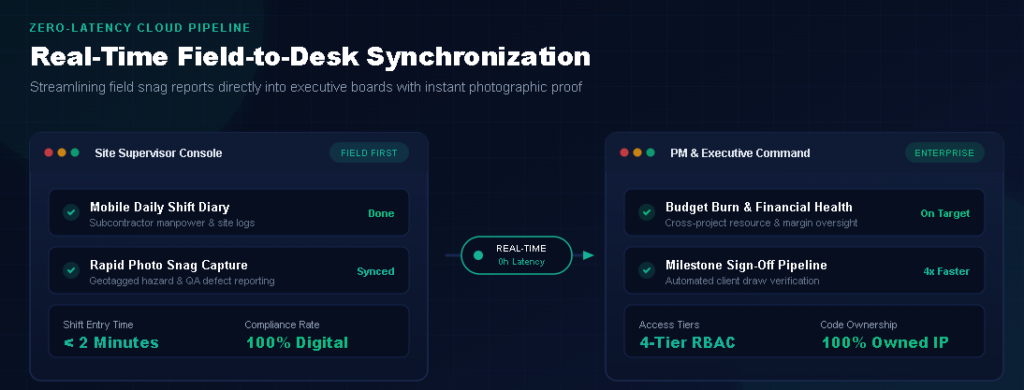
A modern custom construction management software architecture syncs field data instantly with the back office. When a supervisor flags an equipment breakdown or inspection defect on-site, the PM’s web dashboard updates immediately with timestamped photos, trade tags, and geolocation data – eradicating days of administrative lag.
3. Structured Digital Milestone Verification
Disputes over punch lists and physical completion percentages are the leading driver of delayed progress payments and contractor cash-flow bottlenecks. Custom software replaces ambiguous email chains with an auditable three-tier approval pipeline:
- Site Inspection: The site supervisor submits completed work accompanied by mandatory on-site photo verification.
- PM Review: The project manager verifies timeline, budget code, and engineering quality specifications.
- Client Sign-Off: The project owner receives a clean verification package within their portal to review and release progress draws.
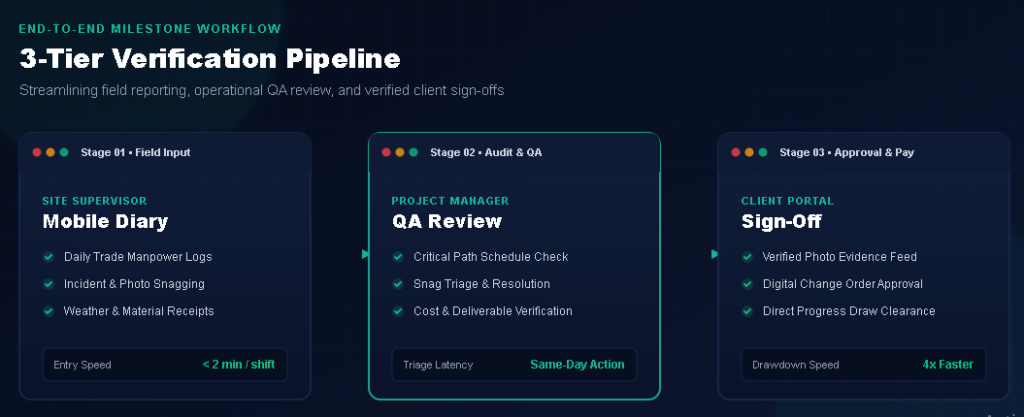
This structured audit trail drastically reduces billing friction, often speeding up milestone payment approvals by up to 4x.
4. Frictionless Mobile Site Diaries
Lengthy reporting workflows kill field compliance. When daily reporting demands 45 minutes of manual desktop data entry, supervisors rush the process or skip days entirely.
Custom software streamlines site diaries into automated, mobile-first inputs:
- On-site worker counts sorted automatically by subcontractor and trade
- Automated weather data pull based on site GPS coordinates
- Material delivery confirmations and digital inventory logging
- Health, Safety, and Environment (HSE) observation logs with direct photo attachments
Standardizing daily shift reporting converts unstructured field notes into structured business intelligence.
5. Automated Client Transparency and Change Order Control
General contractors lose hundreds of administrative hours assembling monthly PDF slide decks and answering routine update requests.
A dedicated client portal built into your software automates stakeholder reporting. Clients can independently inspect milestone progress curves, review curated photo feeds tagged to specific phases, and digitally sign change orders-preventing unapproved field adjustments from eating your margins.
Traditional Site Management vs. Custom Software Architecture
Frequently Asked Questions
What is custom construction management software?
Custom construction management software is a dedicated web and mobile application engineered specifically around the unique workflows, field conditions, and reporting hierarchies of a construction company. Unlike rigid off-the-shelf software, it adapts directly to your existing field operations rather than forcing crews into foreign workflows.
Why invest in custom software instead of commercial SaaS subscriptions?
Commercial SaaS platforms charge steep, per-seat monthly subscription fees that become financially unsustainable as subcontractor networks grow. Investing in custom software built by Zimozi Solutions gives your business complete code ownership, zero per-seat licensing penalties, and a platform built precisely to your competitive advantages.
Does custom construction management software work without an internet connection?
Yes. Modern web applications utilize progressive offline storage (such as IndexedDB and service workers). Field crews can complete daily site diaries, capture inspection photos, and log headcounts completely offline; the platform automatically synchronizes data to the cloud once cellular or Wi-Fi connectivity is restored.
Modernize Your Jobsite Operations with Zimozi
Commercial projects require digital tools that withstand harsh field conditions. Zimozi designs and engineers robust, scalable web applications and enterprise platforms that keep commercial projects on schedule and within budget.
👉Explore the Live Prototype: Zimozi Construction Portal Demo
🚀Discuss Your Architecture: Contact Zimozi Solutions to plan your custom field platform.