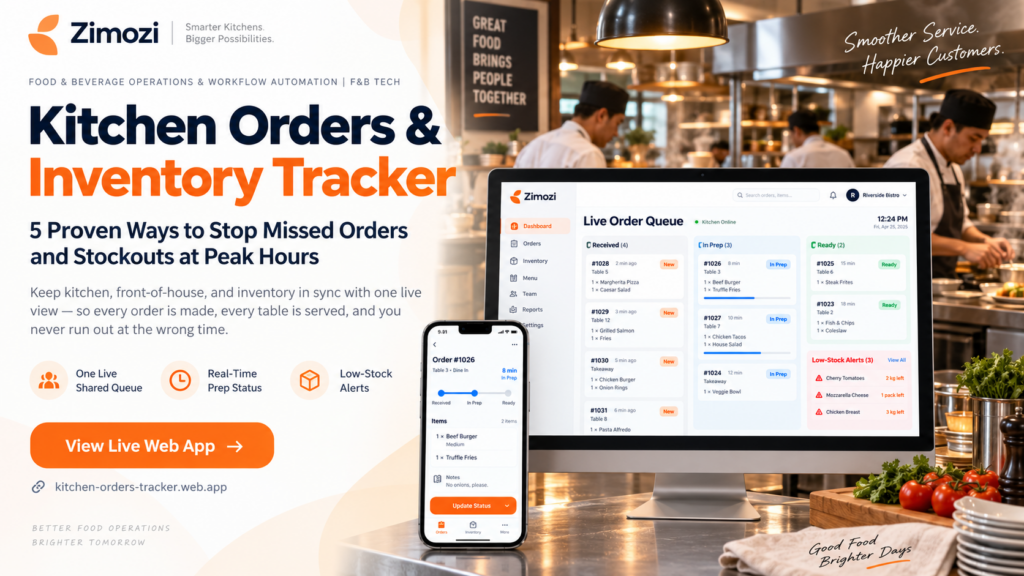
A kitchen orders and inventory tracker is essential for food and beverage outlets managing two interdependent operational streams during rush service: incoming customer orders and kitchen stock levels. Across independent restaurants, cafes, food trucks, bistros, and quick-service outlets worldwide, miscommunication between front-of-house and back-of-house leads to delayed tickets, cold food, and wasted prep.
According to operational research by the National Restaurant Association, miscommunication and ticket delays remain top drivers of customer dissatisfaction and kitchen ticket loss during rush hours. Orders are frequently scribbled on paper chits, shouted across noisy service counters, or relayed verbally. Front-of-house staff cannot see whether a dish is queued, actively cooking, or plated at the pass. Simultaneously, ingredient levels are tracked on scrap paper or noticed only when a container runs empty.
The Kitchen Orders and Inventory Tracker by Zimozi provides an agile, real-time tool engineered for growing food businesses everywhere. By syncing order queues, preparation milestones, and low-stock alerts into one shared interface, this kitchen orders and inventory tracker aligns counter and kitchen teams without verbal interruptions.
Why Paper Tickets Fail Without a Kitchen Orders and Inventory Tracker
Verbal checks and loose tickets work during quiet afternoons, but peak lunch and dinner rushes quickly expose operational bottlenecks. In fact, industry data from Toast Restaurant Trends highlights that order errors drop significantly when kitchens adopt direct visual status cues rather than verbal calls.
- Misplaced and delayed tickets: Paper dockets lack automatic prioritization and slip under other tickets, causing delayed meals and unhappy diners.
- Order status trapped in conversation: Front-of-house staff know an order was placed, but only the line cook knows whether preparation has started.
- Accidental duplicate preparation: When order ownership is unclear, multiple cooks can prepare the same dish, wasting ingredients and labor.
- Cold food sitting at the pass: When the kitchen announces an order is ready but the counter team misses the call, plated dishes sit under heat lamps.
- Mid-service ingredient shortages: Without an active kitchen orders and inventory tracker, depleted stock is discovered only after an order has already been paid for.
- Vulnerability during shift handovers: Operating knowledge lives in individual memories, meaning a noisy room or a brief absence breaks handoffs.
Five Core Capabilities of This Kitchen Orders and Inventory Tracker
Rather than attempting to be an overloaded enterprise software suite, this kitchen orders and inventory tracker focuses strictly on the five essential capabilities required to coordinate meal preparation and stock control:
| Core Operational Feature | Kitchen and Service Impact |
| Incoming Order Queue | Displays a single, organized digital queue of pending orders waiting for preparation, eliminating lost paper tickets. |
| Three-Stage Status Tracking | Transitions orders through Incoming, Preparing, and Ready states so status is clear at a glance. |
| Synchronized Counter and Kitchen View | Keeps front-of-house and back-of-house teams aligned on the exact same queue and order timestamps. |
| Key Ingredient Stock Tracking | Records current quantities of essential items so line cooks and managers share an accurate, live inventory count. |
| Proactive Low-Stock Warnings | Highlights monitored ingredients the moment they hit preset minimum thresholds before stockouts occur. |
How Front-of-House and Kitchen Teams Run Service in Practice
During peak service, front-of-house and back-of-house personnel operate from the identical digital order board:
- Front-of-House Logs the Order: The counter team enters incoming meal requests directly into the queue, removing the risk of misplaced physical tickets.
- Kitchen Receives Instant Visibility: The ticket immediately appears on the kitchen screen, remaining visible even when multiple pans are on the fire.
- Cook Marks the Dish as Preparing: As preparation starts, kitchen staff tap the screen to update the status, signalling to the counter that the meal is underway.
- Kitchen Updates to Ready: Once the food is plated at the pass, the cook marks it Ready, giving service staff an immediate visual indicator to pick up and serve the dish.
- Staff Update Monitored Stock Levels: Using the integrated kitchen orders and inventory tracker view, counts for crucial ingredients are updated to maintain an accurate shift picture.
- Management Acts on Low-Stock Alerts: When an ingredient hits its warning level, the system highlights the item so managers can replenish stock before orders fail.
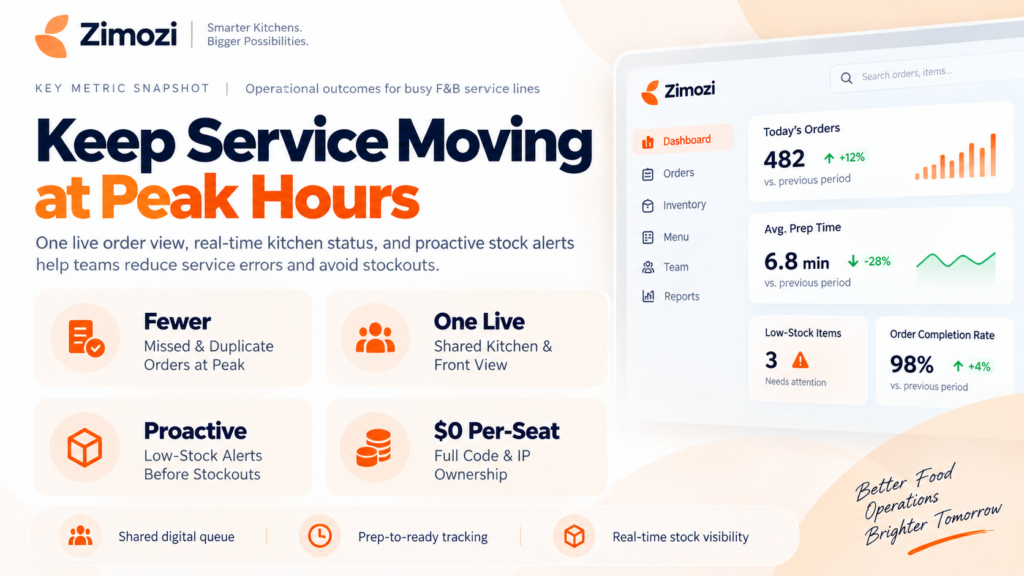
The Advantage of a Lightweight Kitchen Orders and Inventory Tracker
Many food business owners avoid traditional restaurant software because enterprise platforms are slow to configure, costly, and overloaded with modules that complicate daily operations.
This dedicated kitchen orders and inventory tracker operates with a focused scope. Non-essential enterprise modules such as automated recipe yield calculations, complex POS integrations, online payment gateways, supplier purchasing networks, menu costing tables, and accounting ledgers are intentionally excluded.
By focusing strictly on the critical handoff between order intake, kitchen preparation, and stock depletion, the system gives independent food businesses a practical solution that staff can learn and use on shift one.
Frequently Asked Questions (FAQ)
What is the Kitchen Orders and Inventory Tracker?
The Kitchen Orders and Inventory Tracker is a digital operations web application created by Zimozi that provides independent F&B outlets with a unified, real-time view of incoming customer orders, meal preparation stages, and critical ingredient quantities.
Who is this tracker built for?
The platform is designed for food and beverage establishments worldwide—including quick-service restaurants (QSRs), cafes, food trucks, ghost/cloud kitchens, bakeries, and casual dining spots handling high-volume peak service hours.
How does the app prevent duplicate orders and missed tickets?
Every order enters a central digital queue visible to both kitchen and counter teams. Because the order updates live from Incoming to Preparing and Ready, staff do not need to call out status or rely on physical paper chits that can get lost.
Does this application require POS integration or automated recipe deduction?
No. The core system operates independently as an agile operations board, allowing teams anywhere in the world to log orders and track essential ingredient levels without complex POS integrations or technical setups.
How do low-stock alerts protect service continuity?
The kitchen orders and inventory tracker flags tracked ingredients the moment their levels drop to a designated minimum threshold, giving kitchen supervisors sufficient notice to restock items before active customer orders are disrupted.